Note
This way of creating custom fields is deprecated and will be removed in version 3. It is recommended to install the Custom Fields plugin.
For content types as well as products, you can add custom fields. There is a ContentForm and ProductForm class
located in the Cms/Forms directory. They are there for you to use as the need arises.
Let's say for example, you wanted to create a couple of new custom fields for products. Open the ProductForm, and
you will find the buildForm method below`:
<?php

/**
* @param array|null $values Values set by a request or pulled from the database.
* @param string|null $productId The product ID to check against.
* @return Form
* @throws Exception
* @throws ContainerExceptionInterface
* @throws NotFoundExceptionInterface
* @throws ReflectionException
*/
public function buildForm(?array $values = null, ?string $productId = null): Form
{
    return $this
        ->addDecorator(new Bootstrap(['version' => 3]));
}
We will edit the code to add a couple of new fields: SEO Description & Colors
<?php

use function App\Shared\Helpers\get_product_attribute;
use function Qubus\Support\Helpers\is_null__;

public function buildForm(?array $values = null, ?string $productId = null): Form
{
    return $this
        ->add(
            child: 'input',
            options: [
                'type' => 'text',
                'label' => true,
                'name' => 'product_field[seo_description]',
                'id' => 'seo-description',
            ],
            attr: [
                'value' => !is_null__($productId) ?
                        get_product_attribute($productId, 'seo_description') :
                        $values['seo_description'] ?? ''
            ]
        )

        ->add(
            child: 'multi',
            options: [
                'items' => [
                    'blue' => 'blue',
                    'red' => 'red',
                    'green' => 'green',
                    'yellow' => 'yellow',
                ],
                'label' => true,
                'name' => 'product_field[color]',
                'id' => 'color',
            ],
            attr: [
                'value' => !is_null__($productId) ?
                        get_product_attribute($productId, 'color') :
                        $values['color'] ?? ''
            ]
        )
        ->addDecorator(new Bootstrap(['version' => 3]));
}
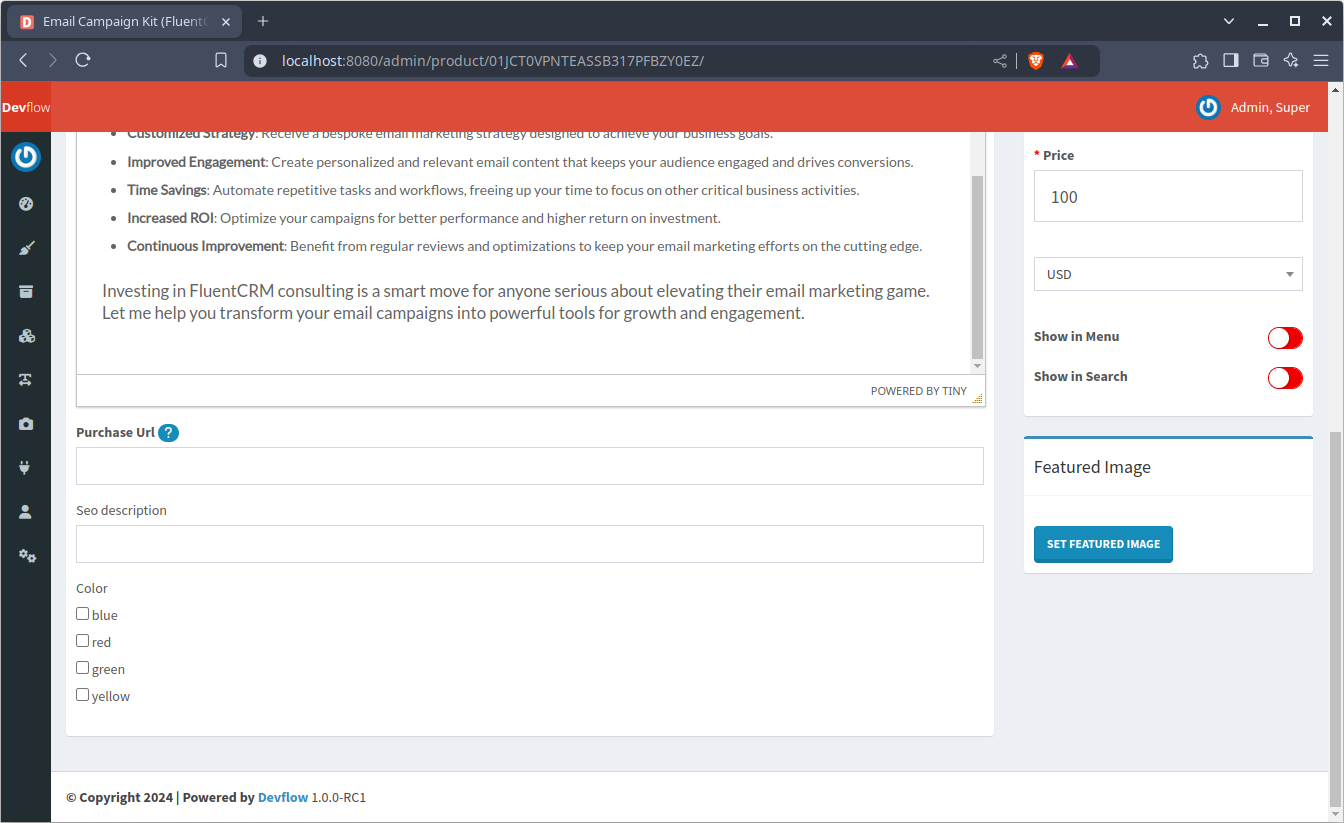
The add method is used to add new fields to our form. One thing to note, is that these are attribute fields.
Therefore, they are submitted as an array, and the field name used is product_field[], and for content types,
you must use content_field[].
The first field added is a text (type) field and an HTML input element. id isn't necessary, label is set to true
to show a label. If label is set to false or undefined, a placeholder will be used instead.
An array of form element attributes can also be passed to the attr parameter. One option is the value.
As you can see, a $productId is checked for null value. If it is not null,
then get_product_attribute will pull the value.
The example above shows you how to add single input fields (input) as well as multi-choice (multi) fields. Below are additional elements you can use to create custom fields:
<?php

declare(strict_types=1);

namespace Qubus\Form;

use Qubus\Form\FormBuilder\Button;
use Qubus\Form\FormBuilder\ChoiceList;
use Qubus\Form\FormBuilder\Control;
use Qubus\Form\FormBuilder\Decorator;
use Qubus\Form\FormBuilder\Decorator\Dindent;
use Qubus\Form\FormBuilder\Decorator\SimpleFilter;
use Qubus\Form\FormBuilder\Decorator\SimpleValidation;
use Qubus\Form\FormBuilder\Decorator\Tidy;
use Qubus\Form\FormBuilder\Div;
use Qubus\Form\FormBuilder\Element;
use Qubus\Form\FormBuilder\Fieldset;
use Qubus\Form\FormBuilder\Group;
use Qubus\Form\FormBuilder\Hyperlink;
use Qubus\Form\FormBuilder\Input;
use Qubus\Form\FormBuilder\Label;
use Qubus\Form\FormBuilder\Legend;
use Qubus\Form\FormBuilder\Select;
use Qubus\Form\FormBuilder\Span;
use Qubus\Form\FormBuilder\Textarea;

public static array $elements = [
    'div'      => [Div::class, ['tagname' => 'div']],
    'form'     => [Form::class],
    'fieldset' => [Fieldset::class],
    'group'    => [Group::class],
    'span'     => [Span::class],
    'label'    => [Label::class],
    'legend'   => [Legend::class],
    'button'   => [Button::class],
    'link'     => [Hyperlink::class],
    'choice'   => [ChoiceList::class],
    'multi'    => [ChoiceList::class, ['multiple' => true]],
    'input'    => [Input::class],
    'select'   => [Select::class],
    'textarea' => [Textarea::class],
    'boolean'  => [Input::class, ['type' => 'checkbox']],
    'text'     => [Input::class, ['type' => 'text']],
    'hidden'   => [Input::class, ['type' => 'hidden']],
    'file'     => [Input::class, ['type' => 'file']],
    'color'    => [Input::class, ['type' => 'color']],
    'number'   => [Input::class, ['type' => 'number']],
    'decimal'  => [Input::class, ['type' => 'text'], ['pattern' => '-?\d+(\.\d+)?']],
    'range'    => [Input::class, ['type' => 'range']],
    'date'     => [Input::class, ['type' => 'date']],
    'datetime' => [Input::class, ['type' => 'datetime-local']],
    'time'     => [Input::class, ['type' => 'time']],
    'month'    => [Input::class, ['type' => 'month']],
    'week'     => [Input::class, ['type' => 'week']],
    'url'      => [Input::class, ['type' => 'url']],
    'email'    => [Input::class, ['type' => 'email']],
];